
01
A seat, apparently
Your character perches on the little wall-mounted table, with the real bench just below.
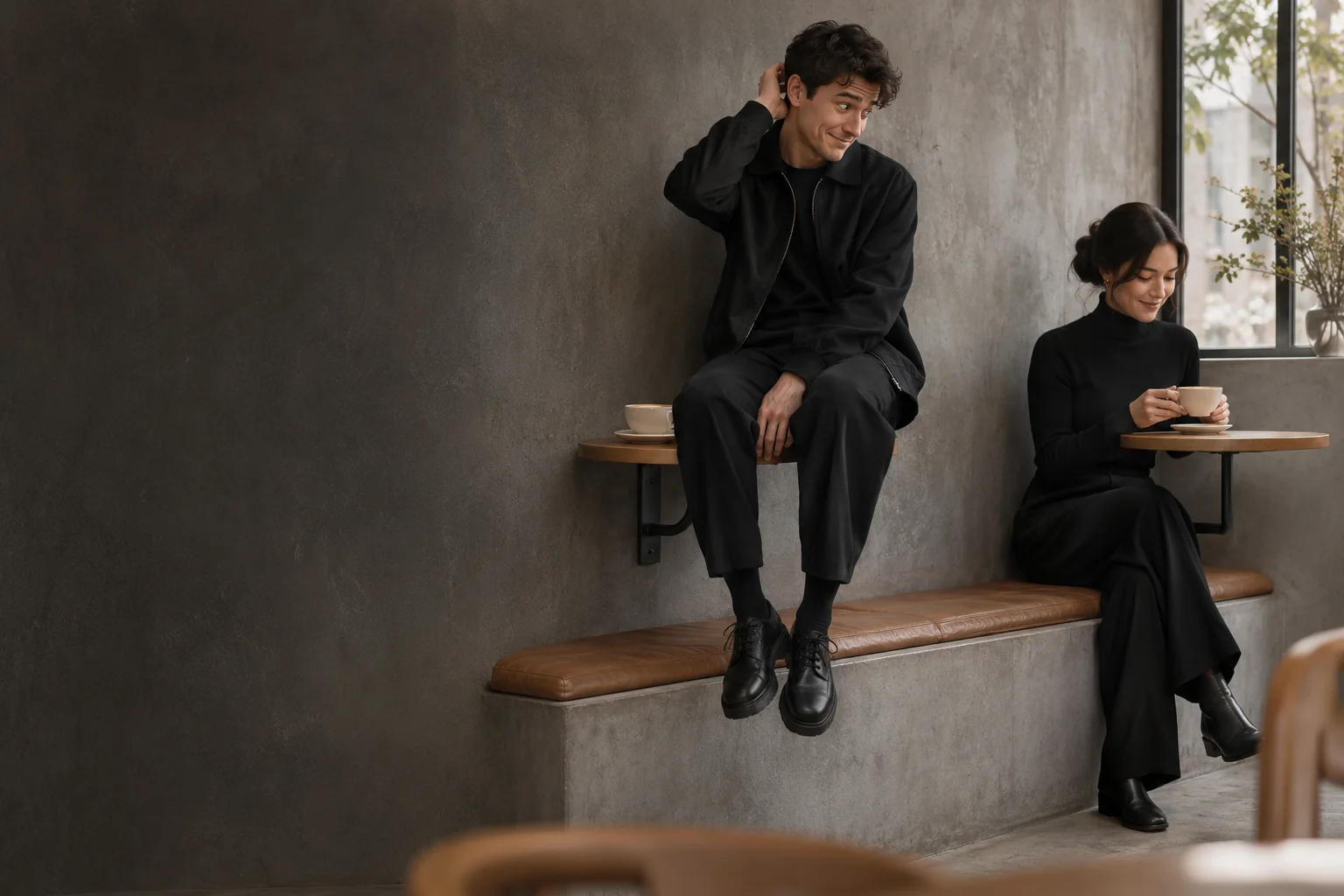
PHOTO TO CAFE MEME · AI VIDEO MAKER
That tiny table looked like a stool. Turn your photo into the awkward cafe moment: a guest sits correctly, you notice, and you slide down as if nothing happened.
AI concept illustration. Your video is generated from your own photos; results vary.
Your photo. Your cafe moment.
Pick who sits on the tiny table, add your photos, and let AI build the awkward realization and casual recovery.
Your cafe story starts here
AI concept illustration of the cafe setup. Your generated video will appear here when it is ready.
THE TINY TABLE MIX-UP
This First Time in a Fancy Cafe meme maker builds the joke around body language and a quiet realization. Choose your role and let the scene unfold.
Your character perches on the little wall-mounted table, with the real bench just below.
A second guest walks in and sits on the bench beside an adjacent table.
Your character notices the proper seat. The pause sells the realization.
A careful slide down to the bench, then an innocent pose beside the coffee.
Choose 10 or 15 seconds for more room between beats. A 5-second version compresses the story; available lengths depend on the selected model.
YOUR PHOTO, YOUR CAFE MOMENT
No timeline editing required. Upload, cast the roles, and start a generation with the price shown before you confirm.
Use one clear person or pet photo for the table sitter or arriving guest. Choose Both of us to add a different photo for each role.
Pick concrete minimalism, a warm cafe or an evening setting. Choose portrait or landscape, an available model and a supported duration.
Sign in, confirm your image rights and use credits to generate. Follow progress, preview your result and download it before its displayed expiry.
FIRST TIME IN A FANCY CAFE VIDEO MAKER
The First Time in a Fancy Cafe AI video maker turns a furniture misunderstanding into a short visual story. The humor comes from recognizing the mistake and trying to hide it. Each generation creates a new scene from your references.
Choose On the table to make your subject the confused sitter, Walking in to make them the confident guest, or Both of us to cast two subjects. With one photo, the AI creates the other character. With two photos, keep one distinct subject in each image.
A clear, well-lit image with visible face and body gives the model more useful detail. For a cat or dog, show the full body and paws. Avoid crowds, tiny faces and heavy occlusion. Portrait 9:16 suits Reels, Shorts and TikTok; landscape 16:9 gives the cafe more space.
The generated clip is silent. Add your caption and licensed audio in the platform where you publish; the original trend recording is not included. Try a caption about pretending to understand fancy places, and label the video as AI-generated. Check the preview for identity and motion before sharing.
Compare prepaid credits for AI image generation, prompt-based editing, and image-to-video clips. Video credit costs increase with duration. Credits last 365 days with no auto-renewal.
Standard: — credits / 5s · Pro: — credits / 5s. A 10-second clip uses twice the credits; 15 seconds uses three times. Seedance pricing appears in the generator.
Starter
For first projects and occasional creative work
Creator
For regular image and video creation
Studio
Best value for teams and high-volume production
BEFORE YOUR FIRST VISIT
It is a photo-based AI meme video maker. A character mistakes a tiny wall-mounted cafe table for a stool, notices another guest sitting correctly, then carefully moves down to the bench. Your photos guide the characters in a newly generated scene.
Yes. On the table uses your photo for the confused sitter. Walking in uses it for the arriving guest. Both of us accepts two photos: the table sitter first and the guest second. In a one-photo mode, the model creates the other character.
Yes. Upload a sharp photo with one pet and its full body visible. The prompt adapts the cafe action to paws and keeps the pet identity as a reference. AI motion and appearance can vary, so review the result before posting.
The maker generates a new clip from your photos and a guided cafe story. It does not paste your face onto the original creator's footage. The setting, timing, expressions and likeness can vary between generations.
Choose 9:16 portrait or 16:9 landscape. Kling O3 reference modes support 5, 10 and 15 seconds; the Seedance options support 5 and 10 seconds. The controls show what is currently configured and available. Longer versions give the full joke more room.
The clip is generated without audio. Add music you are allowed to use in TikTok, Reels or another editor. The original trend soundtrack and a promise of immunity from copyright claims are not part of this generator.
Video generation uses paid credits. You can explore the page and prepare your photos before signing in. The selected model, duration and credit cost appear before generation; use the pricing section to see available credit packs.
While signed in, follow the result in the preview area and recent video history. Download successful videos before the expiry shown there. Failed tasks follow the site's existing credit refund process. If a request loses connection, refresh history before trying again.
Use photos you own or have permission to use, and obtain consent from identifiable people. This independent AI tool is not affiliated with the original creator or social platforms.